
Download Telescope – Search Engine Integration, File Discovery, Web Exploration
Overview
Telescope is a powerful search tool designed to expand the reach of online exploration by integrating more than 40 different search engines into a single interface. Its primary purpose is to help users discover files, websites, images, and directories across the internet with greater depth and breadth than standard search platforms. By aggregating results from multiple sources, Telescope increases the chances of uncovering rare or obscure content that may be overlooked by mainstream engines. This makes it particularly valuable for researchers, content creators, digital archivists, and anyone seeking comprehensive web access.
The app serves as a utility for individuals who need more than surface-level results, offering a way to explore the full scope of online information. Real-world use cases include academic research, competitive intelligence gathering, creative inspiration, and digital asset hunting. While the developer did not provide additional background, the app’s long-standing presence since its release on October 26, 2007, suggests a legacy of reliability and continuous evolution. In the broader app ecosystem, Telescope occupies a niche as a specialized search utility that enhances the user’s ability to navigate the vastness of the internet.
Key Features & Functionality
- Extensive Search Engine Integration: Telescope combines over 40 search engines, enabling users to cast a wide net across the web. This integration increases the likelihood of finding content that may not appear in standard search results, especially obscure or low-traffic sites.
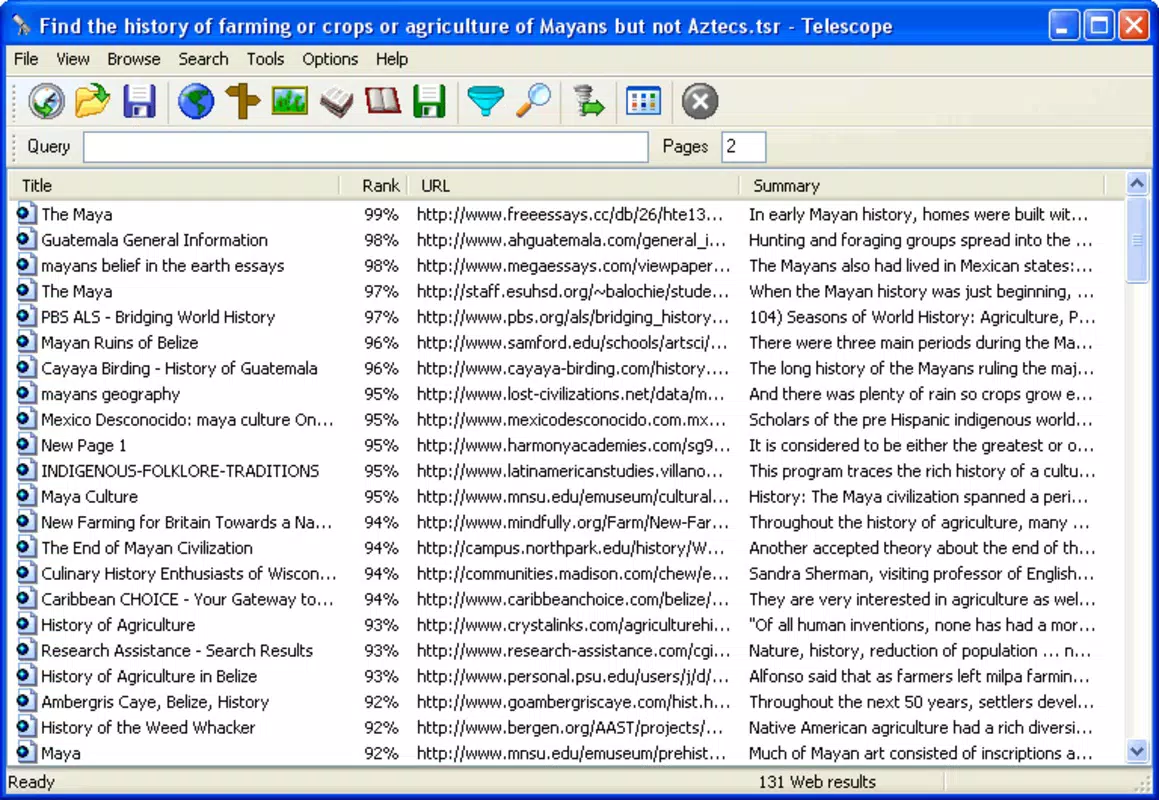
- User-Friendly Interface: The app features a clean, intuitive layout that mirrors familiar search engine designs. Users can enter queries quickly and receive immediate results without navigating complex menus or settings.
- Customizable Search Focus: Users can select specific icons to tailor searches to particular content types—such as images, files, or websites—allowing for more targeted and efficient results.
- Massive Result Pool: By pulling data from diverse sources, Telescope provides a broader range of results, offering users insights into lesser-known corners of the internet and enhancing discovery potential.
For example, a researcher seeking historical documents might use Telescope to simultaneously query academic databases, digital archives, and niche forums. A designer searching for unique visual assets could filter results to prioritize images and downloadable files. These features collectively enhance efficiency and broaden access to digital content.
Interface, UX & Performance
Telescope’s interface is designed with simplicity and accessibility in mind. The layout is clean, with a central search bar and clearly labeled icons for different search types, minimizing cognitive load. Navigation is straightforward, allowing users to switch between search modes with minimal effort. The visual style is functional rather than flashy, prioritizing usability over aesthetic flair.
Although the developer did not list formal performance metrics, the app appears to function smoothly across various device categories. Users can expect responsive interactions, with results loading in a timely manner. Stability is likely maintained through years of updates, though specific technical details were not disclosed. The app does not require excessive system resources, suggesting compatibility with mid-range and older devices. Overall, the user experience is consistent with a mature utility app focused on functionality.
Platform Compatibility & Technical Requirements
Telescope is available on multiple platforms, though the specific operating system was not listed. The software version and file size were also not disclosed. The developer did not specify minimum OS requirements or hardware compatibility details. As such, users should consult official sources for up-to-date information on installation and system readiness. Compatibility with Android and iOS cannot be confirmed based on the provided data.
Pros and Cons
- Integrates over 40 search engines for comprehensive web coverage
- Simple, intuitive interface suitable for all user levels
- Customizable search filters improve result relevance
- Offers access to obscure and niche online content
- Long-standing presence indicates reliability and durability
- Specific platform and OS details were not provided
- Performance benchmarks and system requirements were not disclosed
- No official update frequency or release history available
- Limited visual customization options
- May not be optimized for newer device features like foldable screens or gesture navigation
FAQ
Is Telescope safe to download and use?
Telescope is designed as a search utility, and its safety depends on the sources it accesses. Users should exercise caution when clicking on external links from search results. The developer did not provide specific security details.
Can I use Telescope on both Android and iOS?
The platform availability was not specified. Users should verify compatibility with their device’s operating system through official channels.
Does Telescope require internet access?
Yes, as a search tool, Telescope relies on real-time internet connectivity to retrieve results from multiple search engines.
Is there a free version of Telescope available?
The app’s pricing model was not disclosed. Users should check official sources for information on cost, in-app purchases, or subscription options.
How often is Telescope updated?
The update frequency was not listed. Users are advised to check the developer’s official site or app store listing for the latest version and release notes.
Final Thoughts
Telescope stands out as a robust tool for anyone seeking deeper access to online content. Its integration of over 40 search engines offers a unique advantage in uncovering hidden or underrepresented web resources. While technical details such as platform support and system requirements remain unspecified, the app’s enduring presence since 2007 speaks to its utility and resilience.
It is ideal for professionals, researchers, and curious users who value breadth and depth in their digital exploration. With a straightforward interface and customizable search options, Telescope delivers tangible value in a crowded app landscape. For those who want to go beyond the surface of the web, this tool is a powerful ally.
Download Telescope now


